Key facts
- New Raydium CPMM pool only — not adding to an existing pool
- Initial price ≈ quote deposit ÷ base deposit (adjust for decimals)
- Implied FDV ≈ opening price × supply — use circulating supply for planning
- 0.1 SOL MMAC platform fee + Raydium rent + your deposit + network gas
New pool vs existing pool
MakeMeACoin Create Raydium LP creates a new Raydium CPMM pool only. It does not add liquidity to a pool that already exists on Raydium — use Raydium’s native UI for that workflow.
Initial price is set by your deposit ratio at creation time, not by typing a dollar price. LP tokens land in your wallet; lock, burn, or hold them is a separate decision (see what is locked liquidity).
Opening price example
Example (planning math only — not investment advice): deposit 1,000,000 tokens + 10 SOL as quote side.
With matching decimals adjusted: opening price ≈ 10 SOL ÷ 1,000,000 tokens = 0.00001 SOL per token.
Implied fully diluted valuation (FDV) ≈ opening price × total supply. If only 400,000 tokens are circulating (rest in treasury), use circulating supply for market-cap planning — using total supply overstates FDV.
- Formula: price_token_in_quote = quote_deposit ÷ base_deposit (adjust for decimal places)
- FDV estimate: price × total supply (or circulating supply for float-adjusted view)
- Wrong ratio is costly — correcting usually means removing LP and recreating the pool
Pool creation in the MMAC UI
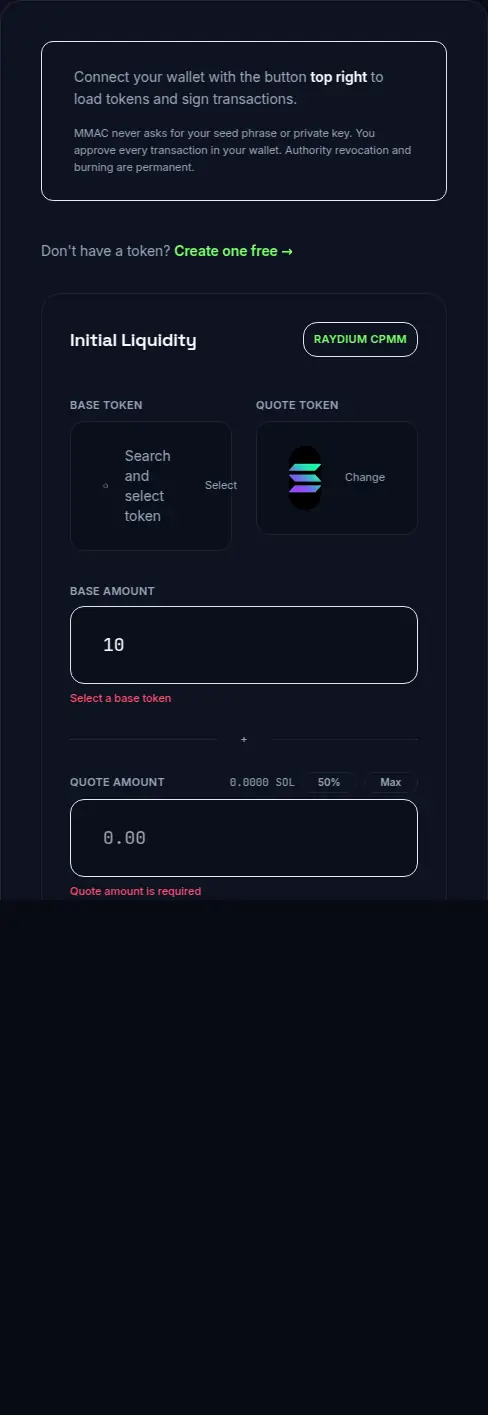
The /lp tool creates a new Raydium CPMM pool: pick base and quote tokens, set deposit amounts (ratio sets initial price), then review platform fee and network rent before signing. MMAC does not lock LP automatically.
Base token is your SPL mint; quote is typically SOL, WSOL, USDC, USDT, or another SPL token held in your connected wallet. Deposit amounts set the opening ratio — not a dollar price field. Platform fee is 0.1 SOL (MMAC); pool rent and your liquidity deposit are separate on-chain costs.
| Step | What you do | What to verify |
|---|---|---|
| 1. Connect wallet | Phantom, Solflare, or Backpack | Wallet holds base tokens + SOL for fees/deposit |
| 2. Base token | Select your SPL mint | Correct mint address — double-check on Solscan |
| 3. Quote token | Pick SOL, WSOL, USDC, USDT, or another SPL token held in your connected wallet | SOL auto-wraps to WSOL when SOL is quote |
| 4. Deposits | Enter base + quote amounts | Ratio sets opening price |
| 5. Review | Check ratio, implied price, fees | 0.1 SOL platform fee + rent shown pre-sign |
| 6. Sign | Approve platform fee tx then pool txs | Do not close wallet mid-flow |
| 7. Confirm | Save pool address + LP mint from Solscan | Small test swap on Jupiter/Raydium |
Example configuration — connect wallet to select base token
Liquidity risks to plan for
- Wrong starting price from deposit ratio — hardest mistake to unwind
- Thin liquidity — high slippage and failed routes on aggregators
- High price impact on first buys/sells — check slippage ladder on Launch Score after pool goes live
- LP tokens in founder wallet — liquidity is pullable until locked or burned
- Remove liquidity risk — anyone holding LP can withdraw reserves
- Decimals mismatch between base and quote — always verify human-readable amounts
- Quote token choice — SOL/WSOL vs USDC changes how traders perceive price
- DEX visibility — Birdeye/DexScreener/Jupiter indexing is third-party; pool creation alone does not guarantee listing timing
What this means
Raydium CPMM documentation describes constant-product pool mechanics. MMAC exposes CPMM creation only — not Orca or Meteora. After pool creation, verify routing with a small Jupiter or Raydium swap and read /what-is-locked-liquidity before claiming “locked liquidity” in marketing.
Step-by-step
- Finalize metadata and consider revoking freeze authority at /launch-tools/revoke before public trading.
- Open /lp, connect wallet, select your token as base and SOL, WSOL, USDC, USDT, or another SPL token held in your connected wallet as quote.
- Enter base and quote deposit amounts — this ratio sets initial price.
- Review platform fee, rent estimate, and implied opening price before signing.
- Sign pool creation transactions (0.1 SOL platform fee + deposits as shown).
- Save pool address and LP mint from Solscan; run a small test swap.
- Decide LP custody: lock with third-party locker, burn, or hold — see /what-is-locked-liquidity.
- Refresh Launch Score at /score/{mint} — liquidity depth and custody affect tradeability.
Next step
Next steps
Related tools
Related guides
FAQ
Which pool types does MakeMeACoin support?
Raydium CPMM only via /lp. Orca and Meteora require their native UIs.
Is this the same as adding liquidity to an existing pool?
No. /lp creates a new Raydium CPMM pool. Use Raydium’s UI to add to an existing pool.
How is initial price determined?
By your deposit ratio at pool creation — not by typing a dollar price field.
What does the LP platform fee cover?
0.1 SOL MMAC fee for guided CPMM creation. Pool rent and liquidity deposit are separate on-chain costs.
Does MMAC lock my LP?
No. Lock or burn LP yourself after creation — see /what-is-locked-liquidity.
Will my pool appear on DexScreener?
Third-party indexers may discover active pools automatically, but timing is not guaranteed by MMAC.
The Solana launch trust layer — free mint, public Launch Score, paid trust actions.